Nemp - Noch ein Mp3-Player

Nemp is a music player for Windows with a powerful media library for managing large music collections. Besides many standard features, Nemp also includes a few more that not every player can offer. For example, an integrated web server for remote control of the player, as well as some gadgets like a "Happy-Birthday-Timer" which automatically interrupts the playlist for a birthday song at the specified time.
Nemp is free, portable and will not change anything in your files - as long as you do not explicitly allow it.
Download Nemp

With version 5.2 Nemp supports metadata in Opus files, cover art in Ogg-Vorbis-comments (in Ogg and Opus files). In addition, some Winamp DSP plugins can now be used with Nemp, e.g. the Shoutcast plugin, so that Nemp can be used as a source for web radio. Details in the version history.
("Noch ein Mp3-Player" is german and translates to "Yet another MP3-Player")

Nemp 5
Version 5 starts a new chapter in Nemp and large parts of the code have been rewritten for it.
The biggest visible change is the introduction of Categories in the media library. This allows you to divide the media library into different sections. You can customize these categories according to your needs.
But also the arrangement in the tree view has been extended, the recognition of albums has been improved and much more. Also new: An online version of the help file: Nemp Help.
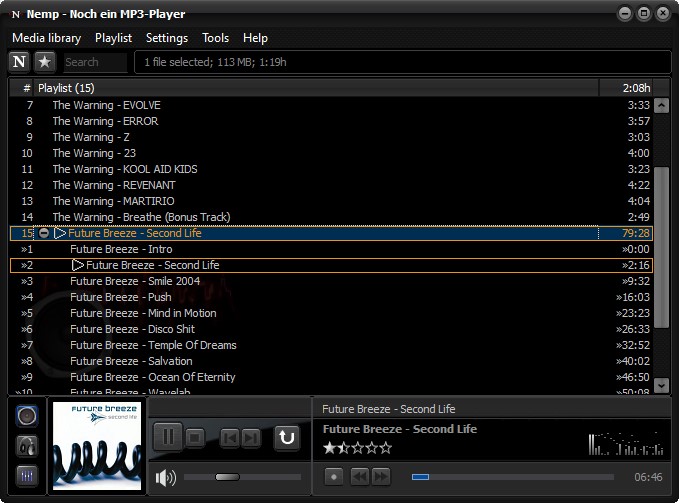
Fill your Playlist and start listening to music
Use Drag&Drop, Copy&Paste or the file selection dialog to fill your playlist with the songs you would like to listen to now. You can also save the playlist and load it again later.
Nemp detects so called Cue sheets automatically. This allows you to play a specific track from an album, even if it is encoded as one large file.

Browse your Music Library
Explore your media library by albums, artists, or directories. Or choose from some other properties like release year or genre. Or use the animated 3D coverflow to display your albums. Or the tag cloud, where you can add more tags as you like. Even those that don't fit into the usual rigid Artist-Album-Title-(...) scheme.
And of course you can also use a quick search function to find a specific title or artist. If you wish, even typos are no longer a problem - or do you always know exactly how many R's, S's and T's are correct in "Alanis Morissette"? Nemp can find all titles anyway.

Non-intrusive
Nemp does not make any changes to your music files without prior permission and does not download (or upload!) anything from the Internet. Therefore, you can try the player completely without risk.
The Nemp Wizard will ask for some useful features at the first start, which can be confirmed or rejected individually. A lot of additional settings can be found in the settings dialog.

The Nemp Webserver
The Nemp Web Server gives you access to many functions of the player via a web browser - especially the search and explore functions in the media library.
You can restrict access for your party guests so that they can use their smartphones to request titles for the playlist and prioritise them via a voting system, but they would not be able to start a new title every ten seconds.
You can also allow tracks to be downloaded to the users device. However, this should only happen in a private context.
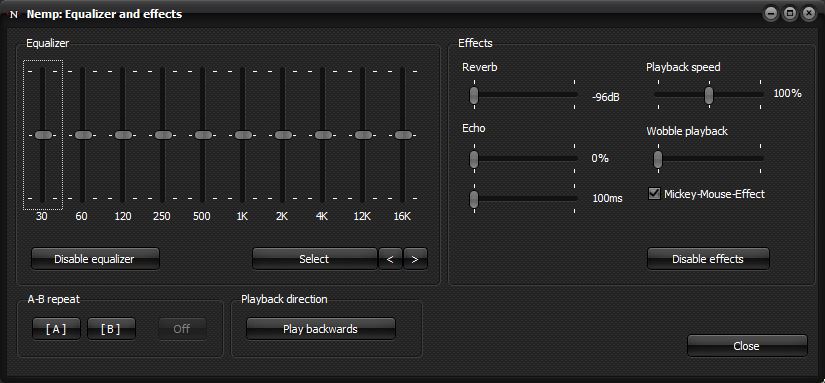
ReplayGain, Equalizer and Sound-Effects
Nemp can calculate so-called ReplayGain values to adjust the volume automatically. The goal is, that all tracks from different sources are played at the same volume.
Nemp can play a second title in parallel via a second sound card. This is intended for previewing a song with headphones at a party without interrupting the main playback.
There is also an equalizer and some effects like echo, playback speed and A-B-repeat. And if the laptop battery weakens, Nemp starts to flutter - just as those old portable cassette players.
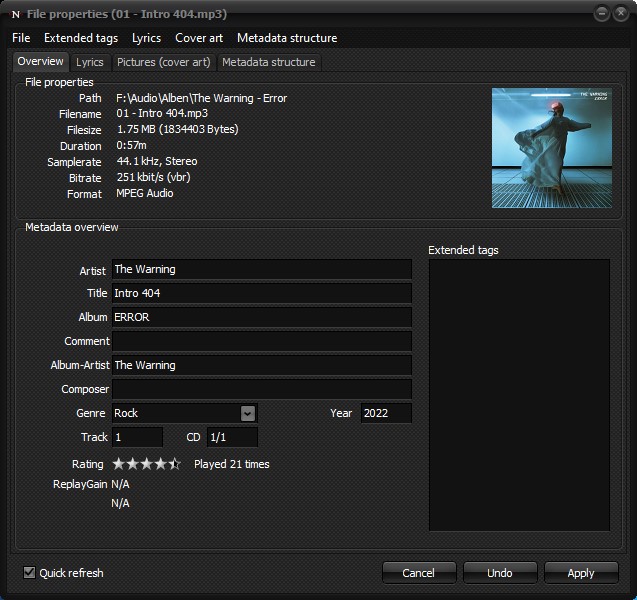
File formats and metadata
Nemp plays pretty much all common audio formats - mp3, ogg, flac, ape, wav, wma, midi, and many more. Also the most common playlist formats like m3u, m3u8, pls, asx and wax are supported.
Nemp reads and writes metadata in the form of ID3-Tags (all existing variants, i.e.: v1, v1.1, v2.2, v2.3, v2.4), APEv2-Tags, Ogg-Vorbis comments (also in .flac files) and the format used in Apples m4a files. Metadata in Windows Media Files are read-only.
Full Unicode support goes without saying.

Nemp is Free Open Source Software
Nemp can be used, modified and copied under the terms of the GNU General Public Licence (GPL). To compile the source code, you need the current Community Edition of Embarcadero Delphi (or similar). Earlier versions of Delphi may work with a few modifications. Delphi 2007 and before will not work.
Additionally some third-party components are used, which can be found in the preliminaries directory within the sourcecode archive. You need to install them first, before you can compile Nemp.
If you want to contribute: Nemp on GitHub.
System requirements
Nemp is relatively modest. If you have a reasonably up-to-date Windows system, it will work. This means:
- Windows 10 or 11 (Windows 7 and Windows 8 may work as well, more or less)
- 30mb free disk space for the software itself
- additionally approx. 10mb/10,000 music files for the media library and caching cover art
(Note: Previous versions did also support Windows XP and Windows Vista. This is not the case any more!)

Nemp on Facebook
Nemp has its own Facebook fanpage.
The first 100 Likes will get the next update for free. ;-)
To the Nemp fanpage.

Donations
If you would like to support me and my work on Nemp, you can make a donation to me through PayPal.
If you have any questions or comments, do not hesitate to contact me: email: mail@gausi.de.